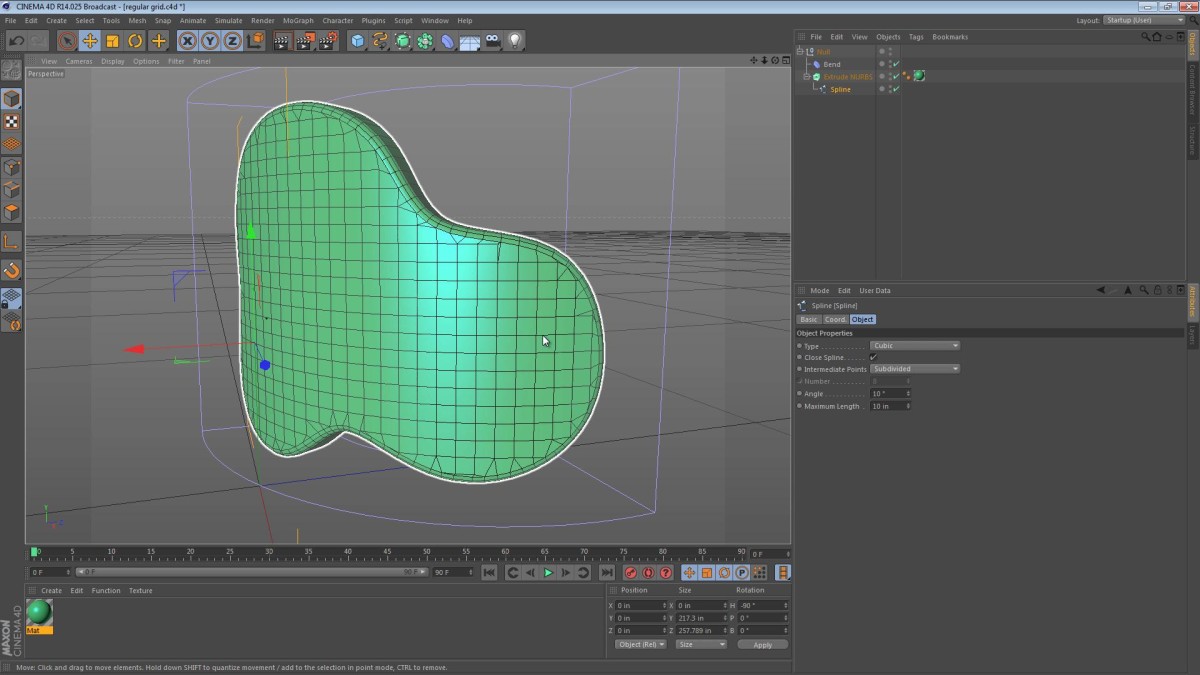
This Five Minute Tip is about the Regular Grid and Subdivided spline options. When used in tandem, these options can provide a very quick and easy way to subdivide geometry that is not yet converted to polygons (in this case, an ExtrudeNURBS object).
The video below shows us bending an ExtrudeNURBS shape and addressing the messy geometry that follows.
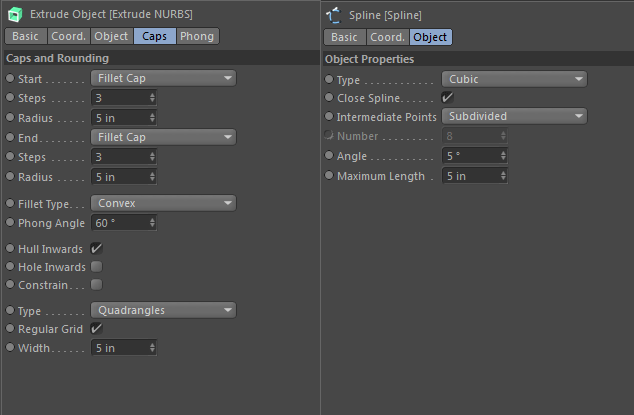
Here’s a couple of screenshots of the settings panes for the options I spoke about in the video.
When was this introduced?
I’ve done a bit of digging on the manuals section of Maxon’s site and I see that both settings were present in the Cinema 4D 9.6 release. There’s also a note that the Subdivided spline option was added in version 9.6 as a supplement to the Regular Grid option which likely predated it.
MIKHAIL
January 5, 2018 — 5:58 am
YOU ARE GOD! THANK YOU!
YeahYeahYeah
June 24, 2015 — 3:06 pm
Big Big Big Thank you. YOU ARE AWESOME! I spent whole day to tackle this
problem. Luckily, I find your great video. PLEASE! Do more such helpful
videos. Thank you so much!!!
garblesnix
May 21, 2015 — 7:18 am
I can’t thank you enough for helping me solve a problem that has been driving me crazy.
I’m attempting to sculpt a rock wall from a theater set to make a 3D trailer and your info is the final piece of the puzzle.
Michael
João Victor Bona
June 19, 2014 — 2:47 pm
YOU ARE THE BEST BRO!!! Thank you very much for doing this!!
Carl Westbrook
May 31, 2014 — 6:33 am
Awesome! Thank you for the very great tip.
Sean O'Skea
October 9, 2012 — 3:34 pm
Jamie:
I’m so glad I subscribed to your channel. You’re becoming one of my favorites. You clearly explain what you’re doing and why. Your pace is perfect. Your speaking voice is clear and you obviously rehearse your tutorials before recoding them. Thanks for making a real effort to put out some quality tutorials.
Sean
Jamie Hamel-Smith
October 9, 2012 — 8:25 pm
Thanks for the kind words Sean!
I’m happy to have you as a subscriber. While I don’t really rehearse, let’s just say that since these tips are so short, I sometimes record multiple takes.
Thanks again for watching!
NightHawkItalo
October 8, 2012 — 8:55 am
Very useful and helpful video,thank you vey much for sharing,I will be wating more useful tutorial if possible 😉
Jamie Hamel-Smith
October 8, 2012 — 2:47 pm
Thanks for the feedback! I’m glad you liked it. Just subscribe to my channel or my site’s RSS feed and you’ll see when I post more.
julian field
October 6, 2012 — 2:14 pm
Many thanks for sharing this, Jamie – excellent work!
Jamie Hamel-Smith
October 6, 2012 — 3:03 pm
No problem, I’m glad you liked it. Thanks!
Jamie Hamel-Smith
October 3, 2012 — 4:00 am
Here’s one of my latest screencasts for Cinema 4D. I’ve been toying with
the idea of a Five Minute Tip format. Thoughts?