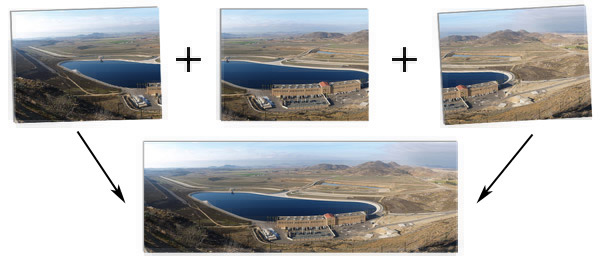
Putting it all together…
Panoramic images can be roughly defined as: A wide angle Photograph or Illustration. These images are not simply captured with a wide angle lens, but usually the term refers to the stitching together of a horizontal sequence of images to form an ultra wide angle view of a space or landscape. The great thing about these panoramas is that anyone with a digital or film camera can easily capture and stitch these images by following a few simple guidelines.
What you need to get started
- You need a PC running Windows
(There are versions for Mac OSX and Linux, but I won’t cover those in this writing.) - A camera to capture the images.
(Digital is best, and if you can lock the exposure and white balance, that’s even better.) - Three small programs: Hugin, Autopano, and Enblend.
- You can also use some of my photos taken at Julian, California
 (zip archive)
What Are The Extra Programs For?
Hugin is the Graphical User Interface for “Autopano” and “Enblend”. It also has features of its own. When you give Hugin a few images to stitch, it will ultimately call on Autopano and Enblend to complete two critical steps of the stitching process (respectively):
- Automatic Control Point Creation (finding the matching points in the photos).
- Blending of the seams between the individual photos.
Download Hugin
Find Hugin at the http://hugin.sourceforge.net/ website.
This tutorial was written using hugin-0.7_beta4. The latest version as of this writing is version 0.7.0_stable. There are a few differences, but this tutorial should get you started. The main difference I have seen is that it won’t ask you for the location of autopano or enblend, and they can be installed along with the software. I would still recommend going to the preferences and specifying autopano and enblend there.
Download Autopano… Not Autopano-Sift
While Autopano-Sift uses a better algorithm, it does not work as reliably and I have had better experiences with Autopano. Grab a copy of Autopano from http://autopano.kolor.com/ (At the very bottom of the page.)
Download Enblend
If you don’t download Enblend before starting the stitching process, Hugin will ask you for the location of it when it gets to the blending stage. Go ahead and download it from http://enblend.sourceforge.net/
Using Hugin
- Adding Images:
Hugin’s opening screen should have a button called “Load images…” Once you’ve chosen your images, a camera and lens data dialog will open. If your images have EXIF data atached to them, Hugin will determine the focal length automatically. However it won’t let you continue until you have entered your camera’s crop factor or angle of view for that focal length. Figure out what sensor size your camera has and determine the crop factor. Here are a few: Olympus E-Series:2, Canon APS-C (Digital Rebel, 30D, 50D):1.62, Nikon DX (D40, D200):1.52
The crop factor will aid Hugin in its calculations. Since I shoot an E-500 from Olympus, my crop factor is a nice round 2. If you’re using a Kodak C433, which has a sensor size of 1/2.5″ (according to http://dpreview.com) then your crop factor is about 6.02 according to the table at Wikipedia. Once you enter the number(s), press OK and away we go! - Select Autopano:
At this point, Hugin is probably going to ask you where the heck the autopano program is. It needs to call on autopano to do some heavy lifting at this point, so navigate to where you unzipped autopano, and choose “autopano.exe”
Once you choose “autopano.exe”, a black and white command window will open and a bunch of numbers will start appearing. Don’t close the window, autopano is thinking.When it’s done, Hugin will come to the front and show you a preview of your panorama. (It should look great already, but with loads of seams.) - Adjusting The Horizon:
On the preview window, you’ll notice a horizontal and vertical line. These represent the center and horizon of your panoramic image. Left click to change the center of the image (It moves both intersecting lines to where you click.) Right click to change the horizon (It only moves the horizontal line and re-distorts the images to fit.) There are a few other buttons and sliders in the preview window, and feel free to tweak them all you like. Close the preview window when you’re done. - Manual Control Point Creation:
Every now and then, you may have wobbled too much when shooting the images, or perhaps a wind shifted your balance. Either way, you may need to help autopano figure out some of the details.
You should still be on the “Assistant” tab of the interface, but let’s take a look at the “Control Points” tab. Each half of the page shows images and image “Zero (0)” should be shown on both halves. Click image “One (1)” on one of the halves. You should be shown the colorful control points that connect the adjacent images. Notice that the arrows at the top of the interface will take you to the next or previous image pairs. If you photographed more than one horizontal row of images (yeah, you can do that), vertically adjacent images will also have connecting control points.
Click an area on one image that you think is worthy of a control point (the interface should zoom into that area). Then drag the control point to a detail (perhaps the corner of a window or a tree branch). Hugin should then attempt to find the corresponding point in the other image. If no warning dialog box appears, then you have successfully found a matching feature in both images (however, if one does appear, continue anyway by manually positioning them). Click the “Add” button to confirm and add the point. These images should now be more accurately connected. - Creating the Panorama:
Head on back to the “Assistant” tab and click “Create Panorama”. After choosing a name and location for your image, Hugin will begin the stitching process by saving distorted versions of your images. You may notice multiple files being created; they’re just an intermediate step and will be deleted.
You should now be asked to locate “enblend.exe”. Navigate to the location you un-zipped it to and select it. Once you’ve shown Hugin where Enblend lives, it won’t ask you to find it again (the same goes for Autopano). At this point, Enblend should start blending the files that Hugin just created and combine them into one large panoramic image. Another black and white command-line window should appear as Enblend works its magic. - Fine-Tuning For Errors:
Sometimes, certain elements in your images may be troublesome (I’m talking to you power lines). If you see an area where the blend or alignment seems to have failed, you can usually remedy this by adding more control points to that area. When you add or remove control points, realignment will be necessary. Head on back to the “Assistant” tab and click the “Align” button. It will then reopen the preview window. After viewing your changes, close the preview window and click “Create Panorama…” again.
Capturing Your Own Images
When shooting images for your panorama compositions, you’ll need to keep a few rules in mind. Actually, instead of rules,consider these guidelines, as you will hardly ever shoot a perfect sequence of images without using a panoramic tripod head. However, it doesn’t hurt to shoot for perfection (no pun intended).
- Try not to move the camera between shots; a common practice is to stand in one spot, and pivot your body while capturing your images. Movement (up, down, left, right, forward, backwards) will cause parallax errors between your images.
- Provide a generous overlap. Don’t have too much overlap or the stitching and blending software may actually introduce artifacts. An overlap of 1/3 is typically a good amount.
- When shooting your image, be aware of a spot near the edge (like a tree, a rock, or perhaps the edge of a building) and make sure it is in your subsequent shot as well.
Michael
February 7, 2014 — 3:57 pm
Hi,
I’d like to confirm with you if it is all right to use your images of Julian Main street from your site in the illustration of panoramic image stitching in a multimedia textbook. I will crediting you for them, of course.
Regards,
Michael
Jamie Hamel-Smith
February 7, 2014 — 4:00 pm
Sure thing. Go ahead and use the Julian main street image. I’d love to know more about the book too 🙂
Michael
February 8, 2014 — 7:53 am
Thanks. Although I haven’t made up my mind yet about the images, I’ll probably use them, because I like the expansiveness of the main street better than the garden I shot. About the book; it is a somewhat comprehensive one on multimedia design and development for beginners’ to intermediate level and covers all main multimedia elements, including text, 2D and 3D graphics, audio, video, 2D and 3D animation, and their integration into an application, the management of the process, various delivery platforms, etc. So, panorama production is only a small part of it.