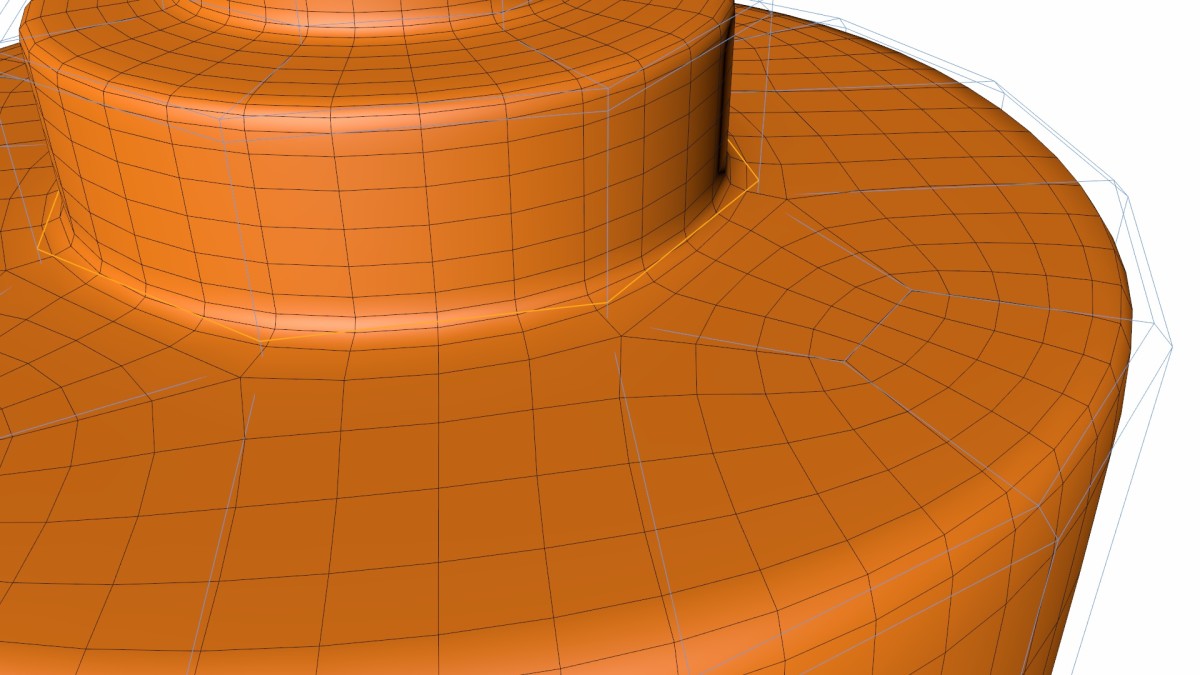
This is one of my longer tips, and it more of a ten minute tip. It focuses on a very simple concept, executed in an elegant manner.
Sometimes when modeling especially in Subdivision modeling you end up with a loop of edges that is too dens for your needs. This can happen when multiple objects merge, or when you are reducing the diameter of a cylindrical object. The below video shows how you can take a loop with an even number of edges, and easily reduce the number of edges therein.
DarkLime
August 3, 2014 — 5:57 pm
5 minute tip *nine minutes*
Lorenzo Di Folco
May 5, 2014 — 6:35 pm
Thanks <3
Marv
December 28, 2013 — 1:02 pm
Thanks, Jamie! The tip about the middle mouse button controlling the brush size and intensity is priceless! Love your 5 minute tips. Keep ’em coming! Thanks.
Michael Ambjorn
December 12, 2013 — 2:40 pm
Great and informative tutorials, thank you!
Anthony Skellern
December 7, 2013 — 8:41 am
That’s ingenious, and very elegant. Thanks, Jamie!
matteo forghieri
November 6, 2013 — 11:55 am
thank you very much! super nice tutorial!
zaphod03
November 5, 2013 — 4:39 pm
Thanks Jamie! another very useful tip! odd in a very good way ; )
davido31
November 4, 2013 — 2:46 pm
Very very useful tut! 😉
NightHawk Italo
November 4, 2013 — 9:19 am
Absolutely great tip my friend…really really useful great tip.
Thank you very much again for this great tip.
psilocyberspaceman
November 4, 2013 — 2:45 am
Really cool tip.
Kai Sinzinger
November 3, 2013 — 10:51 pm
Great! Like your Five Minutes very much!!
amhater
November 3, 2013 — 4:24 pm
3:40 good way to create a phillips head screw.
Greg Arutiunian
November 3, 2013 — 3:13 pm
Nice tip, thanks!
Tankland
November 3, 2013 — 5:25 am
Useful tip, thanks.
Robert Wojciechowski
November 3, 2013 — 4:23 am
Great stuff. Keep the videos coming. Learnt a lot. You explain everything well and you have a sexy voice.
Jamie Hamel-Smith
November 3, 2013 — 4:17 am
Yet another (Ten Minute) Cinema 4D Tip. Please Plus One and comment if you
find it useful. I’m always looking for feedback.